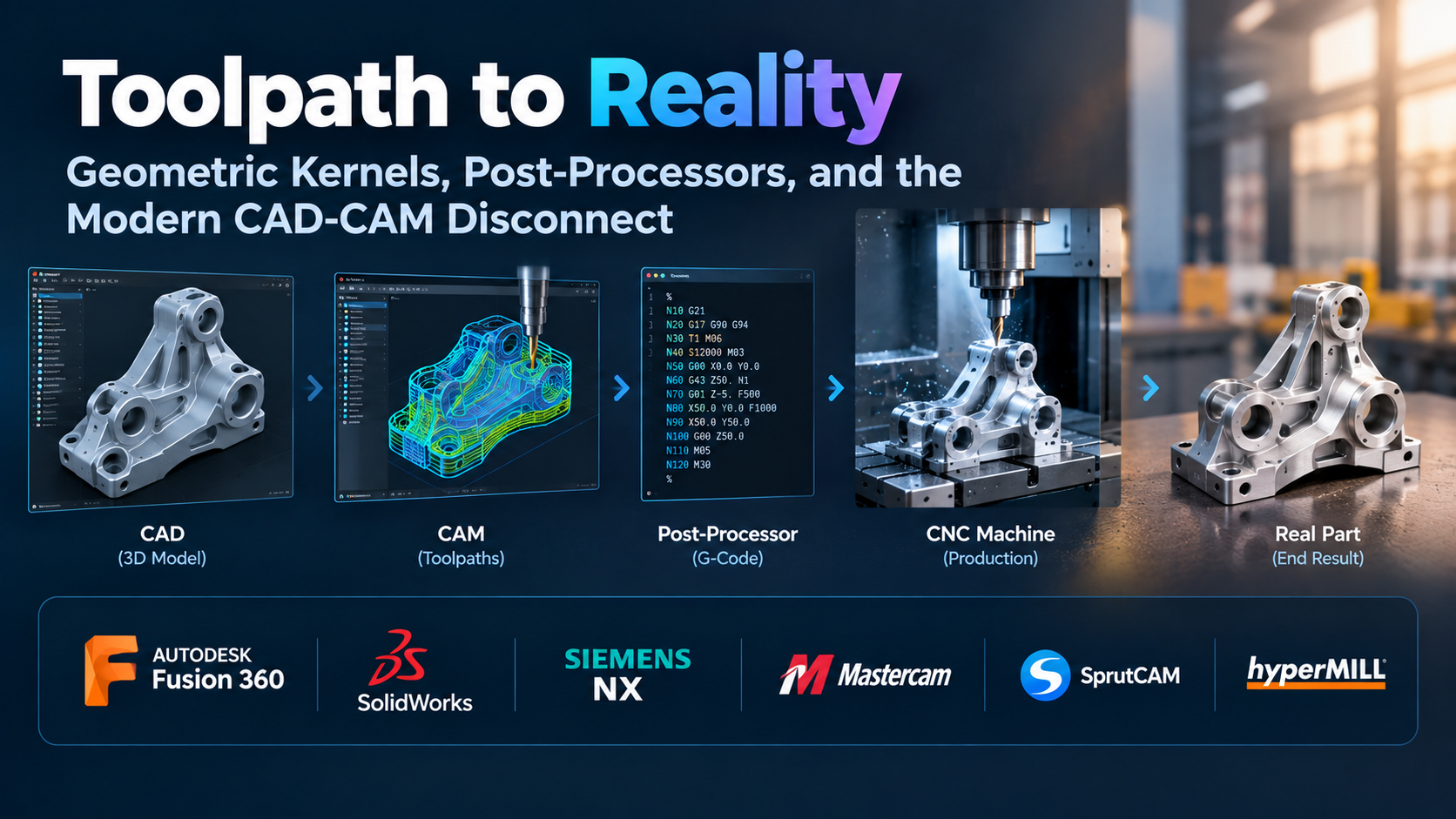
In precision engineering, digital geometry means nothing until it cuts metal, turns stock, or burns a cavity. While mechanical designers live in an idealized world of continuous curves and mathematically perfect intersections, manufacturing engineers operate in a reality governed by cutting forces, chip thinning, spindle harmonic chatter, tool deflection, and thermal expansion.
For decades, the transition from computer-aided design (CAD) to computer-aided manufacturing (CAM) was fractured. A designer built a model, exported a neutral surface file, and threw it over an organizational wall to a programmer who rebuilt tool boundaries from scratch. If an engineering change order arrived, the entire programming process restarted.
The market now offers two distinct strategies: integrated CAD/CAM environments that keep geometry and toolpaths associatively linked, and specialized, standalone CAM engines that treat imported geometry as static raw material to prioritize raw machining performance, multi-axis kinematics, and cycle-time reduction.
Navigating this software landscape requires stripping away promotional claims about automated intelligence and evaluating platforms on their fundamental technical merits: toolpath generation algorithms, post-processor reliability, kinematic collision detection, and how cleanly they maintain engineering intent from sketch to spindle.
The Four Pillars of Modern CAM Architecture
Before evaluating specific platforms, manufacturing engineers and machine shop owners must understand the architectural mechanics that dictate machining efficiency and part quality.
1. Volumetric Engagement and Adaptive Roughing Algorithms
Traditional roughing passes relied on offset contours: a tool stepped down a fixed axial depth and cut inward, accelerating into 90-degree corners and burying the cutter. This caused extreme spikes in cutting force, localized heat accumulation, and broken end mills, forcing machinists to program conservative feeds and speeds.
Modern CAM engines rely on constant-engagement milling algorithms (known under proprietary implementations like Dynamic Motion, Adaptive Clearing, or VoluMill). These algorithms use trochoidal paths and dynamic stepovers to maintain a consistent tool engagement angle and chip thickness throughout the cut:
- Full Axial Depth of Cut: The tool uses its entire flute length rather than just the tip, distributing physical wear evenly.
- Radical Radial Engagement Reductions: Stepovers are reduced to light radial widths (often 5% to 15% of cutter diameter), allowing cutting speeds and feed rates to increase significantly.
- Elimination of Corner Binding: The tool smoothly peels away material in tight pockets without experiencing load spikes, extending tool life and reducing machine spindle wear.
2. Multi-Axis Kinematics: 3+2 Positional vs. Simultaneous 5-Axis
Understanding machine motion controls how software computes collision avoidance:
- 3+2 Positional Machining: The machine locks its rotational axes ($A$, $B$, or $C$) to orient the workpiece, and cuts using standard 3-axis linear moves ($X$, $Y$, $Z$). This allows the use of shorter, more rigid cutters with minimal deflection, but it cannot produce continuous, sweeping organic surfaces.
- Simultaneous 5-Axis Machining: All five axes move concurrently. The software continuously calculates the vector orientation of the cutting tool relative to the surface normal. This requires advanced tool-axis interpolation to avoid machine singularities—mathematical dead zones where a machine table must rotate 180 degrees instantaneously to maintain tool contact, which can cause gouges and surface blemishes.
3. The Digital Machine: G-Code Simulation vs. Internal Toolpath Simulation
A toolpath simulated inside an internal CAM graphic window does not represent what the machine tool will actually execute.
Internal CAM simulations only animate the mathematical cutter location data (CLDATA)—the idealized trajectory before it passes through a post-processor. This fails to account for controller acceleration and deceleration limits, rotary axis physical travel limits, coordinate system shifts, or custom macro logic.
True manufacturing verification requires G-code-driven digital twin simulation. The software must read the raw, post-processed G-code back into a virtual kinematic assembly of the actual machine tool, checking for physical casting collisions, spindle nose clearances, fixture strikes, and axis limit overtravel before sending code to the shop floor.
4. The Post-Processor: The Vulnerable Bridge
The post-processor is the software translation layer that converts internal vector coordinates into machine-specific numerical control (NC) code (such as Fanuc, Heidenhain, Siemens Sinumerik, or Haas dialects).
A CAM system can calculate the most sophisticated 5-axis toolpaths in the industry, but if its post-processor misinterprets plane transformations (like $G68.2$ tilted work planes) or RTCP (Rotational Tool Center Point / $G43.4$), the program will cause a machine crash. The commercial model of a CAM system—whether post-processors are open and customizable by the end-user or locked behind expensive vendor services—is a critical factor in total operational cost.
Evaluating the Leading CAD/CAM Manufacturing Platforms
The manufacturing software landscape divides into broad categories: all-in-one integrated product suites, legacy production workhorses, and specialized high-speed multi-axis engines.
Autodesk Fusion: Accessible Integrated Fabrication
Autodesk Fusion has disrupted entry-to-mid-tier manufacturing by pairing a parametric CAD modeler directly with a capable 2.5- through 5-axis CAM engine in a single subscription.
- Primary Differentiator: Associative CAD/CAM continuity. If a part dimension changes in the CAD design workspace, the CAM workspace flags the affected toolpaths and recalculates them with a single click. There is no file translation, no neutral format export, and no broken boundary geometry.
- Machining Strengths: Fusion’s 2D and 3D Adaptive Clearing algorithms are derived from the mature HSMWorks engine, providing reliable, high-efficiency roughing out of the box. Its integrated sheet nesting, turning, probing routines, and accessible multi-axis toolpath configurations allow small-to-midsize job shops and prototyping labs to program parts rapidly without complex third-party software handoffs.
- Operational Limitations: Fusion relies on a hybrid desktop-cloud architecture. While local toolpaths calculate without internet access, heavy generative design passes, team project assets, and collaborative data management reside on remote servers. For high-volume production facilities, mold makers requiring specialized electrode design suites, or aerospace contractors operating under air-gapped data-compliance mandates, its cloud infrastructure and lightweight drafting toolset can introduce administrative friction.
Mastercam (CNC Software / Sandvik): The Production Shop Standard
Mastercam remains the most widely installed standalone CAM package globally, serving as the benchmark across production machine shops, contract manufacturing facilities, and industrial machine training centers.
- Primary Differentiator: Decades of specialized toolpath maturity and widespread operator familiarity. Finding experienced Mastercam programmers is easier than finding programmers for almost any competing package, minimizing onboarding delays for scaling shops.
- Machining Strengths: Mastercam’s Dynamic Motion technology is exceptionally refined, providing fine-grained control over chip loads, micro-lifts, and thermal management during high-speed milling. Its mill-turn module handles multi-spindle, multi-turret operations with synchronization timelines, and its wire EDM and multiaxis toolsets cover virtually every industrial cutting method.
- Operational Limitations: While Mastercam includes internal geometric modeling tools, its standalone CAD capabilities lag behind modern parametric feature-based engines. It is fundamentally a tool for programming toolpaths on imported geometry. Significant design changes in external CAD models require re-importing dumb solids and re-associating geometries, which can disrupt complex toolpath setups.
hyperMILL (OPEN MIND Technologies): The High-Precision Multi-Axis Benchmark
hyperMILL is an engineering-grade CAM suite built specifically for complex multi-axis milling, turbine blisk production, mold and die tooling, and tight-tolerance aerospace components.
- Primary Differentiator: Mathematical precision in 5-axis collision avoidance and specialized milling cycles.
- Machining Strengths: hyperMILL’s 5-axis strategies feature automated collision avoidance algorithms that dynamically calculate the optimal tool tilt angle, allowing machinists to use the shortest possible cutting tools without colliding with high-walled cavities or complex fixtures. It offers proprietary cycles, such as high-performance barrel cutter (conical end mill) strategies, which increase stepover distances while maintaining surface finishes, reducing cycle times for curved surfaces significantly.
- Operational Limitations: hyperMILL is a high-cost, specialized engineering platform. It requires operators with strong mathematical and machining expertise to utilize its full capability. For straightforward 2.5-axis prismatic milling or basic turning, its depth, cost, and complexity are excessive.
Siemens NX CAM: Enterprise Scale and Complete Digital Twins
Siemens NX CAM operates at the top tier of heavy industrial manufacturing, standard across aerospace propulsion, automotive power units, and large medical implant facilities.
- Primary Differentiator: Deep integration with Siemens Teamcenter PLM and direct B-rep modeling without geometry conversion loss.
- Machining Strengths: NX CAM handles the entire manufacturing process within a continuous digital thread. Designers, tool designers, fixture engineers, and NC programmers operate on the same master model. NX includes native integrated simulation and verification (ISV) powered directly by the internal virtual Sinumerik controller kernel, running virtual machine kinematics directly from post-processed NC code. It also provides advanced feature-based machining (FBM), which inspects CAD geometry, identifies holes, pockets, and chamfers, and applies standard tooling strategies automatically based on defined shop rules.
- Operational Limitations: High operational overhead. Deploying, configuring, and maintaining NX CAM requires dedicated systems administration, custom post-processor development, and intensive training. It is an industrial platform designed for large manufacturing enterprises, making it economically and logistically impractical for small job shops.
SolidCAM: Embedded Native Toolpaths for Established CAD
SolidCAM integrates professional-grade CAM directly into existing desktop CAD environments, primarily operating as a certified add-in for SolidWorks and Autodesk Inventor.
- Primary Differentiator: Native embedded operation paired with its patented iMachining technology.
- Machining Strengths: SolidCAM’s iMachining features an algorithmic Technology Wizard that calculates optimal cutting conditions based on the machine’s mechanical limits, tool material, and exact workpiece stock properties. It continuously modulates cutting speeds, feeds, and stepovers to maintain a constant mechanical load on the tool, reducing programming guesswork for exotic alloys like Inconel or titanium. Because it sits directly inside the CAD feature tree, geometry changes propagate to toolpaths associatively.
- Operational Limitations: SolidCAM requires an underlying seat of its host CAD software (such as SolidWorks), compounding software subscription overhead. Programmers are bound to the host CAD platform’s interface, stability, and desktop Windows hardware requirements.
Architectural and Operational Comparison
| Software | CAD/CAM Architecture | Primary Kinematic Focus | Core Toolpath Technology | Post-Processor Accessibility | Primary Operational Trade-off |
| Autodesk Fusion | Fully Integrated Hybrid Cloud CAD/CAM | 2.5-Axis to 5-Axis Milling, Turning, Probing | Adaptive Clearing (HSM Engine) | Open-source JavaScript posts; easily user-customizable | Cloud dependencies; limited native mold tooling and advanced electrode suites |
| Mastercam | Standalone CAM (with internal utility CAD) | 2.5-Axis to Continuous 5-Axis, Mill-Turn, Wire EDM | Dynamic Motion Technology | Proprietary language (.pst); managed primarily by value-added resellers | External CAD changes break toolpath associations; older internal CAD core |
| hyperMILL | Standalone CAM or CAD Plugin (hyperCAD-S) | Complex 5-Axis, Impellers, Mold/Die Tooling | Automated 5-Axis Collision Avoidance; Barrel Cutter Cycles | Custom high-end posts; heavily configured by vendor engineers | High software and maintenance costs; steep technical barrier to entry |
| Siemens NX CAM | Fully Integrated Enterprise CAD/CAM/PLM | High-Volume Industrial, Multi-Axis, Mill-Turn | Feature-Based Machining; Integrated Controller (ISV) | Post-Builder / Post Configurator; deep custom TCL architecture | Complex enterprise administration; high licensing and setup costs |
| SolidCAM | Fully Embedded CAD Plugin (SolidWorks/Inventor) | 2.5-Axis to Multi-Axis, Multi-Channel Swiss/Turn | Patented iMachining Technology Wizard | Standardized and custom post engines; reseller support network | Requires dedicated host CAD license; bound to desktop workstation specs |
The Hidden Costs of CAM Implementation
Evaluating CAM software based purely on the initial software seat license frequently leads to budget shortfalls. Industrial manufacturing facilities face three major hidden expenses:
1. The Post-Processor and Machine Kit Tax
Never assume a CAM system will run a multi-axis machine tool out of the box. While generic 3-axis fanuc posts are widely available, multi-axis machines, mill-turn centers, and Swiss lathes with live tooling require custom post-processors and kinematic 3D machine models.
Vendors and value-added resellers (VARs) routinely charge thousands of dollars per machine to author, test, and debug a complex post-processor. If a shop operates five machines from different builders with varying control systems, the post-processor development and kinematic verification costs can easily match the price of the software license itself.
2. Physical Machine Tool Crashes
The true cost of poor CAM software or inadequate verification is measured in physical damage. Rapid-traverse moves into fixture clamps, incorrect tool length offset calls ($G43$), or unverified rotary unwind commands can shear spindle bearings, damage ball screws, and cause catastrophic downtime.
When an unverified CAM toolpath generates post-processed G-code that runs directly on a CNC machine without G-code simulation, the operational fallout is severe:
- Spindle Rebuild Costs: Precision spindles frequently cost tens of thousands of dollars to replace or remanufacture.
- Protracted Downtime: Machines can remain offline for weeks awaiting parts and laser realignment.
- Scrapped Raw Materials: Late-stage machining collisions destroy high-value forgings, castings, and billet materials.
- Schedule and Contract Penalties: Production halts cause missed delivery deadlines and customer attrition.
Dedicated G-code verification software (such as CGTech VERICUT) or advanced internal virtual machine controllers (like those in Siemens NX or hyperMILL) protect operations by proving the machine motion in software before running parts on the shop floor.
3. File Formats, Translation Loss, and Model Revisions
When shops run standalone CAM packages that do not read native CAD feature histories, models are passed via neutral formats (STEP, IGES, or Parasolid).
This introduces three operational friction points:
- Translation Anomalies: Loose modeling tolerances in the original CAD system can cause stitched surface edges to open, leaving gaps that cause CAM calculation errors or gouge-check failures.
- Loss of Feature Intelligence: A hole modeled in CAD contains metadata: thread pitch, tap drill size, and tolerance class. Once exported as a standard STEP file, it becomes a “dumb” cylinder. The CAM programmer must manually measure the diameter, identify the thread, and select the correct drill and tap cycles manually.
- Engineering Revision Overwrites: When the design team alters a pocket depth or relocates a hole pattern, the disconnected programmer cannot simply regenerate toolpaths. They must import the new solid, re-select cutting boundaries, and verify that zero toolpath parameters were dropped during the process.
Strategic Selection Framework
To identify the right CAD/CAM manufacturing software, align your shop’s operations with these distinct production profiles:
Path A: The Agile Prototyping Lab, Hardware Startup, or High-Mix Job Shop
- Operating Profile: Low-volume parts, rapid turnaround, frequent design changes, mixed 3-axis and basic 5-axis operations.
- Recommended Platform: Autodesk Fusion.
- Deciding Factor: Associative CAD/CAM velocity and low overhead. When parts are being designed and machined in the same facility, the ability to modify a CAD feature and have the CAM toolpaths regenerate automatically saves significant engineering time. Open-source post-processors and low deployment friction allow small shops to turn spindles quickly without large capital commitments.
Path B: The Established Production Contract Machine Shop
- Operating Profile: Medium-to-high volume production, dedicated CNC programmers, diverse mix of milling, turning, and mill-turn machine tools.
- Recommended Platform: Mastercam or SolidCAM.
- Deciding Factor: Reliable toolpath efficiency and labor market availability. Production shops need optimized roughing cycles that cut seconds off part cycle times over thousands of cycles. Mastercam provides a vast network of trained programmers and proven stability across standard controllers. For shops whose design workflow is centered in SolidWorks, SolidCAM provides native CAD embedding backed by automated toolpath optimization via iMachining.
Path C: The High-Precision Tool & Die, Mold, or Aerospace Impeller Facility
- Operating Profile: Hardened steels, tight-tolerance organic surfaces, continuous 5-axis aerospace structures, turbine components.
- Recommended Platform: hyperMILL.
- Deciding Factor: Advanced multi-axis collision avoidance and specialized surface finishing cycles. When machining complex deep-cavity molds or thin-walled turbine blades, standard multi-axis sweeps can chatter or collide. hyperMILL’s barrel cutter cycles and predictive tool-tilting algorithms deliver the surface finishes and collision protection that high-value components require.
Path D: The Integrated Industrial Enterprise
- Operating Profile: Large corporate engineering facilities, unified design-to-production pipelines, enterprise PLM dependencies.
- Recommended Platform: Siemens NX CAM.
- Deciding Factor: Digital thread governance and native controller simulation. When an aerospace or automotive manufacturer must track thousands of engineering requirements, maintain revision control across distributed manufacturing plants, and simulate operations using a virtual CNC controller, NX CAM provides the required enterprise governance.
Validating CAM Software Before Purchasing
Before signing long-term licensing contracts or purchasing post-processor packages, demand a hands-on verification process that tests the software using your actual machine tools and materials:
- The Native CAD Revision Challenge: Provide the vendor with a complex prismatic part containing multiple pockets, tapped holes, and chamfers. Have them program the part, then supply an updated CAD model with altered pocket depths, resized holes, and relocated mounting features. Measure how long it takes to update the toolpaths and observe whether the programmer must manually re-select geometry.
- The Hard Material Adaptive Roughing Test: Cut an actual physical test block on your shop floor using the software’s adaptive roughing engine in a difficult material (such as 4140 steel, 304 stainless, or titanium). Inspect the spindle load monitor during pocket clearing: does the load remain flat and consistent, or does it spike when the tool enters corners and slotting passes?
- The G-Code and Post-Processor Audit: Require the software vendor to produce a working post-processor for your most complex machine tool (such as a 5-axis trunnion or a mill-turn lathe with sub-spindle). Run the unedited G-code through a dedicated external simulator or carefully air-cut the part on the machine. Confirm that the post correctly manages clearance planes, work coordinate offsets ($G54$ through $G59$), and smooth rotary axis unwinds without manual operator intervention.
- The Tooling Library Integration Check: Evaluate how the platform handles cutting tool geometry and cutting parameters. Can it import 3D solid models directly from tooling manufacturer catalogs via standard protocols (such as ISO 13399), accurately representing the cutter, shank, extension, and tool holder for true collision detection?
