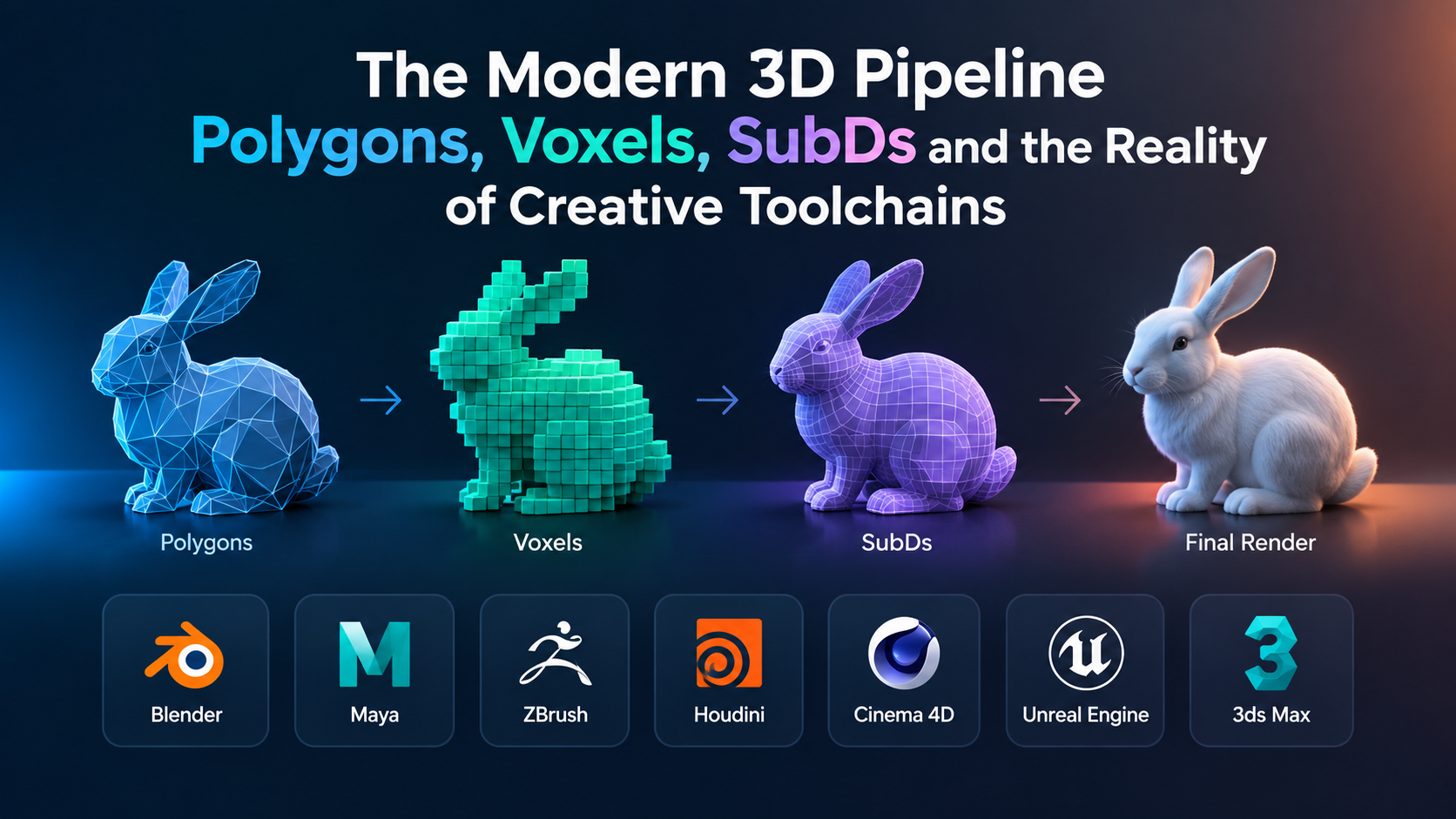
The phrase “3D modeling” describes fundamentally divergent technical disciplines. A tool engineered to calculate the stress-tolerant wall thickness of an injection-molded enclosure operates on completely different mathematical principles than a program designed to deform a creature’s facial topology for real-time game rendering, or an algorithmic engine generating architectural facades.
Treating 3D modeling software as a single product category is the primary reason creative studios, game developers, and visualization artists waste thousands of dollars on ill-fitted seat licenses. Choosing the wrong underlying geometry engine introduces severe technical bottlenecks: unoptimized polygon counts that crash game engines, non-manifold geometry that breaks 3D printers, or rigid topologies that fail during character rigging.
Understanding the modern 3D ecosystem requires examining the mathematical paradigms that define digital geometry, evaluating how specialized tools integrate into production pipelines, and mapping software capabilities directly to output requirements.
The Four Geometries: How 3D Software Actually Represents Shape
Before evaluating individual applications, creators must understand the geometry type their delivery target demands. 3D modeling tools are defined by the underlying mathematical representations they manipulate.
1. Polygonal Meshes and Subdivision Surfaces (SubD)
Polygonal modeling represents 3D objects as collections of vertices, edges, and faces (typically three-sided triangles or four-sided quads). Subdivision Surface modeling (SubD) takes a base polygonal mesh and algorithmically smooths it by recursively dividing faces, allowing artists to manage a lightweight control cage while displaying high-resolution curvature.
Polygonal modeling remains the universal language of real-time applications, visual effects (VFX), and interactive media. Because game engines calculate lighting and rasterization across flat planar triangles, polygonal topology must be strictly controlled. Poor topology—such as irregular triangles, five-sided polygons (n-gons), or non-manifold edges—causes shading artifacts and prevents clean deformation when an asset bends during skeletal animation.
2. Digital Sculpting and Voxel Grids
Traditional polygonal modeling struggles with organic complexity like human skin, fabric folds, and anatomical contours. Digital sculpting bypasses manual vertex manipulation by treating models like virtual clay.
High-resolution sculpting operates either through dynamic tessellation (adding polygons on the fly where the digital brush contacts the surface) or through voxels (volumetric pixels). Voxel-based engines do not define an object by surface planes; they define it as a three-dimensional grid of density values. This allows artists to pull horns out of a sphere, punch holes through a torso, or tear geometry apart without encountering polygon stretching.
However, high-density sculpted assets routinely reach 20 to 80 million polygons—far too dense for animation rigs or real-time simulation. Consequently, sculpting represents only the initial phase of an organic asset pipeline, always requiring downstream retopology to bake high-resolution surface details into normal and displacement maps over an optimized, low-polygon mesh.
3. Procedural and Node-Based Systems
Procedural modeling replaces manual geometry creation with algorithmic instructions. Instead of manually moving vertices, the artist constructs a node network that defines rules: a path curve is generated, scattered with points, populated with instanced geometry, randomized by noise fields, and dynamically sliced based on proximity to other scene assets.
Procedural workflows are non-destructive. If an art director requests that an entire procedural city layout transition from square city blocks to circular rings, the artist modifies an input parameter or base curve rather than rebuilding millions of polygons by hand. The trade-off is an abstract, mathematically dense workflow that demands strong technical literacy and spatial problem-solving.
4. Mathematical Surfaces: NURBS and CAD Boundaries
Unlike polygonal tools that approximate curves using series of flat facets, Non-Uniform Rational B-Splines (NURBS) and Boundary Representation (B-rep) systems define geometry using true mathematical curves and analytic surfaces.
These tools dominate industrial design, automotive styling, and physical manufacturing. If a polygonal sphere is scaled up by a factor of one thousand, its individual flat triangular faces become obvious; if a NURBS surface is scaled up, the computer recalculates the curve, maintaining flawless smoothness. However, because real-time graphics chips cannot natively render analytic curves, NURBS models must be tessellated into polygonal meshes before entering games, AR/VR experiences, or virtual production environments—a conversion step that frequently introduces messy topology if not configured properly.
Evaluating the Primary 3D Creative Suites
Modern 3D workflows rarely rely on a single isolated program. Production pipelines link specialized tools for sculpting, texturing, rigging, and simulation. The following platforms represent the industry standards across digital content creation, visual effects, and design.
Blender: The Unified Open-Source Standard
Blender has transformed from an idiosyncratic open-source project into a foundational tool for independent studios, concept designers, and commercial visualization teams. It offers a comprehensive pipeline in a single, zero-cost package: polygonal modeling, sculpting, UV unwrapping, rigging, animation, procedural geometry via Geometry Nodes, grease pencil 2D/3D hybrid animation, and two distinct render engines (Cycles for path tracing, EEVEE for real-time viewport evaluation).
Blender’s primary architectural differentiator is its rapid development velocity and open Python scripting environment. Its Geometry Nodes workspace has grown into a production-capable procedural environment, allowing artists to build parametric asset generators, hair groom systems, and environment scatter setups without leaving the main DCC (Digital Content Creation) application.
Its limitations appear primarily in enterprise pipeline integration. Large visual effects facilities with complex, legacy proprietary software often struggle to integrate Blender into deeply customized Linux-based workflows optimized around commercial automation tools. Furthermore, while Blender’s sculpting toolset handles conceptual design and medium-density meshes comfortably, it encounters performance bottlenecks when pushed to the extreme, multi-million-polygon counts required for high-frequency skin pores or microscopic textile detailing.
Autodesk Maya: The Animation and Studio Pipeline Backbone
For decades, Maya has functioned as the standard pipeline hub for film, episodic television, and AAA video game character production.
Maya’s dominance does not stem from its base polygon modeling tools, which are functional but conservative. Its strength lies in its underlying node architecture, its dependency graph, and its advanced character rigging and animation toolsets. Tools like the HumanIK system, matrix-driven constraint workflows, and the Bifrost procedural graph make it exceptionally stable when handling complex skeletal rigs, skin weights, and physics-driven character interactions.
The platform’s primary drawback is accessibility and software bloat. Maya relies on a costly subscription model, and its user interface carries years of accumulated legacy menus that present an intimidating learning curve. For single artists or small studios that do not require deep rigging or shared studio pipeline integration, Maya’s operational overhead often outweighs its production benefits.
Maxon ZBrush: The Undisputed High-Resolution Sculpting Standard
ZBrush occupies a unique position in digital sculpting. Built on a proprietary 2.5D “Pixol” memory architecture rather than standard 3D viewport pipelines, ZBrush allows an artist to sculpt models with tens of millions of active polygons on consumer-grade hardware without noticeable viewport stutter.
Its feature set is purpose-built for organic concept artists, character modelers, creature designers, and toy/collectible sculptors. Tools like DynaMesh permit continuous topological rebuilding during freeform volume expansion; ZRemesher provides semi-automatic retopology that converts organic sculpts into workable quad meshes; and HD Geometry enables sub-surface micro-pore sculpting at resolutions that standard polygonal engines cannot open.
ZBrush is an expressive, artistic sculpting tool, not a full production suite. It lacks traditional scene animation, rigging, and advanced layout tools. Its UI relies on specialized spatial navigation paradigms that diverge entirely from standard 3D software conventions, requiring artists to spend substantial time building muscle memory before achieving a fluid workflow.
Autodesk 3ds Max: Architectural Visualization and Hard-Surface Systems
While Maya captures character animation, Autodesk 3ds Max remains deeply entrenched in architectural visualization (ArchViz), environmental art, civil engineering previews, and industrial game asset pipelines.
3ds Max excels at hard-surface modeling through its mature Modifier Stack. The stack functions as a non-destructive parametric history list: an artist can apply an edit-poly operation, add a chamfer modifier, project a UV map, apply a symmetry pass, and then step backward to alter the foundational splines while keeping all downstream modifications intact. It also maintains deep legacy interoperability with architectural design formats like DWG, Revit files, and specialist rendering plugins such as Chaos V-Ray and Corona.
Conversely, 3ds Max’s animation, character skinning, and rigging toolsets have received far less development attention than Maya’s, and the software remains strictly tied to the Windows operating system, limiting its adoption in Linux-centric studio environments.
SideFX Houdini: The Procedural VFX and Data-Driven Titan
Houdini does not operate like conventional 3D software. Rather than providing tools to manually mold geometry, Houdini is an interactive, visual visual-programming environment where every asset, simulation, and scene is an executable node network.
Houdini is the standard for visual effects simulation: fluid dynamics, pyroclastic explosions, structural destruction, dynamic ocean surfaces, and particle networks. However, it has increasingly become the back-end engine for game development studios building procedural open worlds. Using Houdini Engine, artists package complex procedural graphs into interactive tools that level designers run directly inside game engines like Unreal Engine and Unity, allowing them to instantly generate terrain, roads, cliff faces, and modular architecture based on simple vector guide paths.
The trade-off is an exceptionally steep mathematical learning curve. Effectively utilizing Houdini requires understanding vector mathematics, matrix transformations, and Houdini’s native VEX scripting language. Modeling a simple household prop like an office chair manually inside Houdini is slow and counterintuitive; modeling an entire procedural office park with dynamic interior layouts, however, is a task no other tool handles with comparable efficiency.
Cinema 4D: Broadcast Graphics and Procedural Motion
Developed by Maxon, Cinema 4D has carved out an enduring position as the premier 3D tool for broadcast design, television motion graphics, commercial title sequences, and user interface visualization.
Its core differentiator is the MoGraph toolset. MoGraph makes the animation and duplication of complex geometric arrays, typography, and abstract shapes extraordinarily simple. Artists can clone thousands of objects and drive their scale, position, color, and rotation using fields, sound frequencies, or procedural falloffs without writing code. Paired with its tight integration with Adobe After Effects and the embedded Redshift rendering engine, it provides the fastest path from conceptual 3D layout to motion-designed composite video.
For character-centric visual effects, complex game-ready topology preparation, or large-scale technical engineering simulation, Cinema 4D is rarely the first choice. Its geometry and deformation toolsets, while clean and stable, do not match the specialized depth of Maya for character performance or Houdini for heavy physics.
Technical and Operational Comparison
The table below breaks down the primary architectural differences, platform dependencies, and ideal implementation scenarios across the leading creative 3D suites.
| Platform | Primary Geometry Engine | Core Specialization | Integration Strengths | Supported Platforms | Practical Trade-Off |
| Blender | Polygons, SubDs, Geometry Nodes | All-in-one general creation, indie games, concept art | Python API, Alembic, USD, native Cycles/EEVEE | Windows, macOS, Linux | Slower performance on massive, multi-million polygon sculpting meshes |
| Autodesk Maya | Polygonal Meshes, SubDs, NURBS | Character rigging, skeletal animation, studio pipelines | Universal USD/Alembic pipeline, deep C++/Python API | Windows, macOS, Linux | High cost; complex, legacy interface; excessive for static modeling |
| Maxon ZBrush | Pixol-driven High-Res Meshes, Voxels | Organic sculpting, concept creatures, digital miniatures | GoZ bridges, high-to-low poly map extraction | Windows, macOS | Non-standard navigation; no comprehensive rigging or animation suite |
| Autodesk 3ds Max | Parametric Modifier Stack, Polygons | Hard-surface assets, architectural visualization, environments | Seamless Autodesk CAD/Revit linking, V-Ray/Corona engines | Windows only | Outdated character animation toolset; platform-locked to Windows |
| SideFX Houdini | Node-Based Procedural Geometry, VDB Voxels | Complex simulation, FX dynamics, algorithmic world-building | Houdini Engine for Unreal/Unity, VEX scripting, open USD | Windows, macOS, Linux | Steep mathematical learning curve; impractical for quick, one-off prop modeling |
| Cinema 4D | Polygons, Parametric Cloners (MoGraph) | Motion graphics, broadcast design, commercial title work | Tight Adobe After Effects connection, embedded Redshift | Windows, macOS | High recurring subscription; limited deep character rigging toolsets |
Critical Factors in Pipeline Interoperability
Individual tool performance matters far less than how cleanly geometry, textures, and animation data move between software packages. Modern 3D production relies on standard interchange formats to prevent data fragmentation:
Universal Scene Description (OpenUSD)
Pioneered by Pixar, OpenUSD has emerged as the definitive standard for enterprise visual effects, virtual production, and large-scale asset collaboration. Unlike older formats that merely pass raw geometry, USD defines an entire hierarchical scene graph. It supports non-destructive composition layers, allowing one artist to work on character animation while another tweaks surface shading and a lighting director adjusts the virtual camera rig within the same shared master file—without overwriting each other’s data.
MaterialX and Shading Portability
Traditionally, moving a textured 3D asset from a creation suite into a rendering engine required completely rebuilding its shader graphs, because each render engine computed light absorption, micro-roughness, and specular falloff differently. MaterialX provides an open standard for rich surface and shading descriptions. A MaterialX-compliant shader network built during asset production retains its mathematical visual fidelity whether it is rendered in an offline path tracer or viewed inside an interactive real-time viewport.
Retopology, Texture Baking, and Polygon Budgets
The bridge between high-density artistic creation and functional interactive media is the baking pipeline:
[ High-Density Sculpt / CAD Asset ] (Millions of Polygons)
              │
              ▼
    [ Retopology Process ] (Manual Quad Flow or Algorithmic Remeshing)
              │
              ▼
   [ Low-Density Optimized Cage ] (Engine-Ready Polygonal Shell)
              │
              ▼
[ Normal & Displacement Map Extraction ] (High-frequency details baked to 2D textures)
              │
              ▼
 [ Production-Ready Game/Real-Time Asset ] (PBR Textures + Lightweight Topology)
- High-Density Sculpting: An artist creates an anatomical model in ZBrush or a procedural terrain in Houdini containing tens of millions of polygons.
- Retopology: The artist constructs a clean, lightweight control cage over the dense silhouette, ensuring edge loops follow the deformation axes of muscle groups or mechanical hinges.
- UV Unwrapping: The low-poly mesh is flattened into 2D coordinate space (UVs) to receive texture assignments.
- Baking: The software projects rays between the low-poly surface and the high-density original, baking fine geometric variations (skin wrinkles, bevels, casting marks) into 2D normal, ambient occlusion, and displacement textures.
This workflow demonstrates why an all-in-one software mentality often fails: the ideal environment for step one (ZBrush) is rarely the ideal environment for step two and three (Blender or Maya), which in turn hand off to dedicated real-time engines.
Strategic Selection Framework
To select the right 3D modeling toolset without overpaying or over-engineering your pipeline, map your output requirements across these practical production profiles:
Scenario A: The Independent Game Developer or Digital Content Generalist
- Primary Need: Complete asset creation (modeling, unwrapping, texturing, basic rigging) on a limited operational budget.
- Strategic Path: Adopt Blender as the central hub. Supplement it with specialized texturing tools if needed, but rely on Blender’s modeling, sculpting, and Geometry Nodes workspaces. The absence of recurring seat fees allows smaller teams to invest capital into dedicated workstation hardware and display tablets instead of software overhead.
Scenario B: The Entertainment, Cinematic Character, or AAA Rigging Pipeline
- Primary Need: Complex skeletal systems, character performance capture, multi-artist pipeline compatibility.
- Strategic Path: Utilize Autodesk Maya as the master scene and animation assembly package, paired with Maxon ZBrush for high-resolution anatomical sculpting. This pairing remains the most tested, easily staffed, and commercially supported character pipeline in the creative industry.
Scenario C: The Motion Designer, Broadcast Artist, or Agency Visualizer
- Primary Need: Fast turnaround on kinetic typography, animated identity packages, procedural product reveals.
- Strategic Path: Deploy Cinema 4D coupled with an integrated GPU renderer (such as Redshift or Octane). The speed of the MoGraph system and its native bridge to 2D compositing suites minimizes technical troubleshooting, allowing small agency teams to deliver polished visual animations on aggressive commercial timelines.
Scenario D: The Procedural World-Builder or Technical FX Artist
- Primary Need: Environmental simulation, destruction sequences, large-scale modular game environments.
- Strategic Path: Build around SideFX Houdini. Invest the necessary time into learning vector math, VEX scripting, and data-driven geometry manipulation. Utilize Houdini Engine plugins to deliver interactive, procedural toolkits directly to environment artists working inside game engines.
Verifying Capabilities Before Studio Deployment
Before signing recurring enterprise licensing agreements or retraining a creative team, conduct four structured technical tests using your studio’s actual target assets:
- The Dynamic Topology Stress Test: Ingest an ultra-dense, non-optimized 3D asset (such as an un-decimated photogrammetry scan or complex raw sculpt). Push the viewport lighting to evaluate display performance: does the software maintain responsive navigation framerates, or does viewport latency make precise modeling impossible?
- The Pipeline Round-Trip Check: Model an asset, assign material shading properties, export it via OpenUSD or FBX, and import it into your target game engine or compositing tool. Verify that vertex normals, UV seams, smoothing groups, and material parameters translate cleanly without requiring manual repair in the target application.
- The Non-Destructive Revision Test: Model an intricate, multi-component hard-surface prop. Step back to the base feature or early modifier and alter a primary structural dimension (such as an exterior wall radius or foundational taper). Observe whether downstream fillets, booleans, and UV coordinates update predictably or break into non-manifold geometry.
- The UV and Retopology Workflow Audit: Take a complex organic shape and run it through the program’s retopology and UV unwrapping toolset. Measure the hands-on time required to produce clean, quad-dominant edge loops and undistorted texture coordinates. If manual mesh cleanup consumes hours for simple assets, the software will become a recurring bottleneck in high-throughput production cycles.
