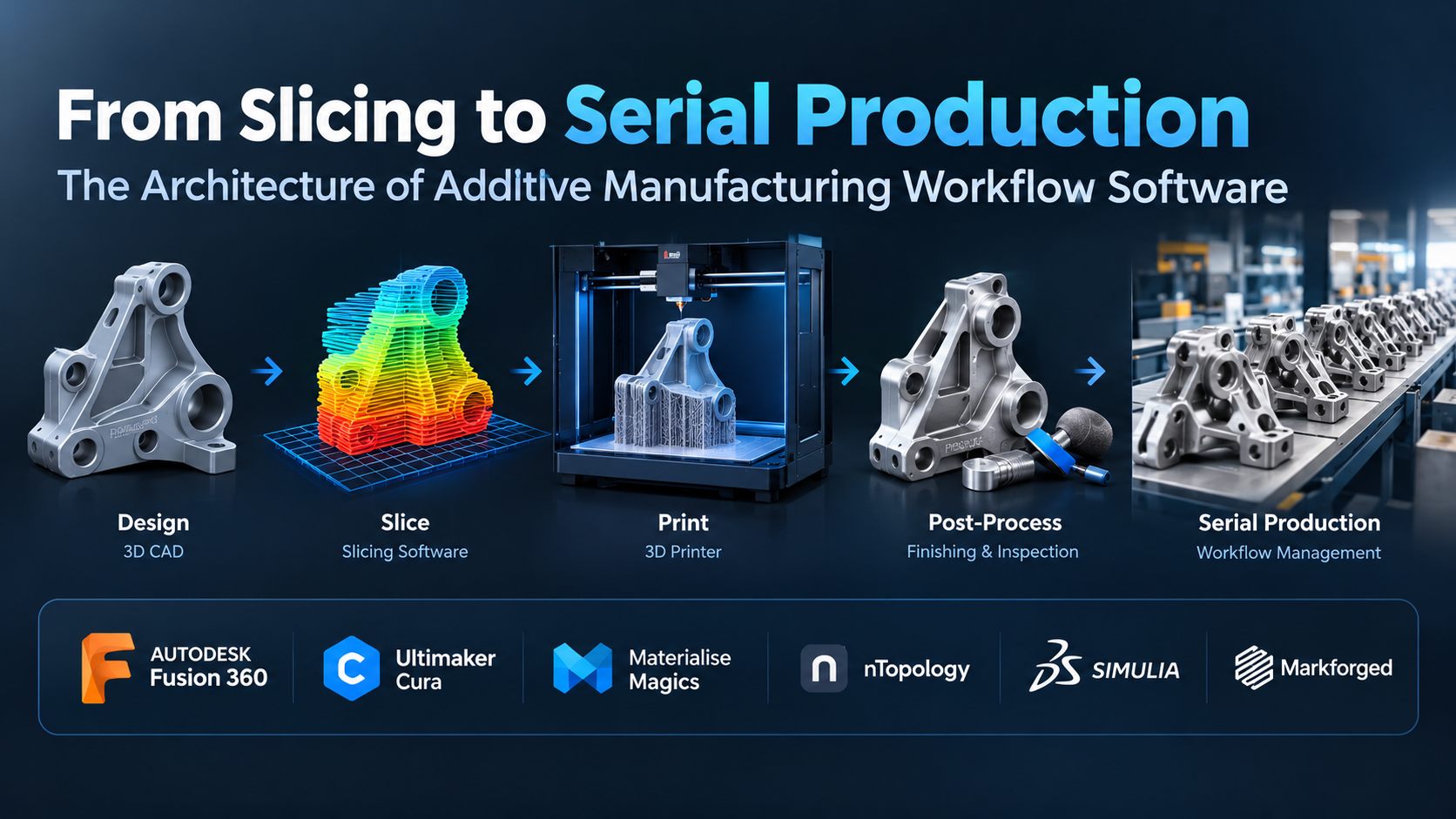
For an engineer running a single desktop printer, the additive workflow is straightforward: open a CAD file, export an STL or STEP, configure infill and layer heights in a slicer, transfer G-code, and press start.
For an industrial production facility, a rapid prototyping bureau, or a distributed manufacturing hub, that process is completely inadequate.
When operations scale from three machines to thirty, the bottlenecks shift away from print speed and toward software coordination: untracked design revisions, unverified part orientations, scattered build logs, uninspected mesh defects, idle build chambers, and disconnected post-processing steps. A technician manually re-slicing individual files on a local workstation quickly becomes the most expensive, error-prone link in the factory.
Bridging the gap between a design file and a qualified physical component requires additive manufacturing workflow software—a software category that unifies mesh preparation, automated build packing, machine-level execution, fleet management, and Manufacturing Execution Systems (MES).
The Four Layers of the Additive Software Stack
Industrial additive manufacturing cannot function on standalone slicing engines alone. Enterprise workflow software coordinates four interconnected operational layers:
1. Data Preparation and File Repair
CAD boundary representations (B-rep) must be translated into discretized fabrication data. Standard exports often introduce inverted surface normals, self-intersecting shells, non-manifold edges, and open seams.
Production data-prep platforms automatically heal these mesh anomalies, generate lightweight lattice structures to optimize strength-to-weight ratios, and apply anisotropic orientation algorithms. Orientation directly dictates build time, support volume, surface finish on critical sealing faces, and directional tensile strength along the Z-axis.
2. Multi-Technology Build Preparation and Support Generation
Support generation varies fundamentally across printing technologies:
- Fused Deposition Modeling (FDM / FFF): Requires sacrificial mechanical scaffolding configured for quick breakaway or chemical dissolution, designed around nozzle clearance and overhang angles.
- Stereolithography and Photopolymerization (SLA / DLP): Demands delicate touchpoint networks that resist peeling forces while minimizing surface scarring during mechanical part removal.
- Powder Bed Fusion (SLS / SLM / DMLS): In polymer powder beds (SLS), parts require zero support scaffolding, making automated 3D nesting essential to maximize build density without thermal clustering. In metal powder beds (DMLS/SLM), supports serve primarily as thermal heat sinks to conduct extreme localized melt-pool heat into the baseplate, preventing thermal residual stress and severe part warping.
Enterprise workflow software handles thermal simulation, automatically predicting thermal stress concentrations and adjusting toolpaths before expensive titanium or nickel alloy powders are exposed to laser sintering.
3. Fleet Orchestration and Real-Time Telemetry
Once toolpaths are compiled, software must dispatch jobs to available hardware based on material loaded, nozzle diameter, build volume envelope, scheduled maintenance windows, and operating priority.
Real-time telemetry gathers sensor feedback—such as chamber temperature, laser galvo positioning, melt-pool optical emission, and layer-by-layer optical scanning—to detect print failures, delamination, and porosity anomalies as they happen.
4. Additive MES, Traceability, and Regulatory Governance
In aerospace, medical device, and defense manufacturing, a printed part is worthless without certified provenance. An additive-specific MES logs raw material lot numbers, machine calibration records, operator identities, in-situ monitoring imagery, stress-relief heat treatment logs, and final coordinate measuring machine (CMM) inspection data into a permanent Device History Record (DHR).
Evaluating Leading Workflow and Production Platforms
The additive software landscape is divided into three distinct operational categories: dedicated geometric pre-processing engines, end-to-end industrial MES suites, and fleet-centric printer management systems.
Materialise Magics: The Standard for Industrial Data Preparation
Materialise Magics is the long-standing benchmark for industrial data preparation and build platform management, standard across high-end service bureaus and metal additive centers.
- Core Capabilities: Magics operates directly on facet and CAD data with exceptional mathematical precision. Its automated repair engines handle corrupted non-manifold geometries that crash standard slicers. Its automated 3D nesting algorithms pack irregular geometries into SLS/MJF powder cakes with minimal bounding-box volume waste. For metal PBF, its dedicated SG+ module generates rigid thermal-anchor supports and calculates lattice structures designed to prevent recoater blade collisions.
- Workflow Strengths: Deep hardware neutrality. Through machine-specific build processors, Magics communicates natively with an extensive range of industrial equipment, from EOS, SLM Solutions, and Trumpf to HP Multi Jet Fusion and Stratasys systems.
- Operational Limitations: Magics is fundamentally an expert desktop pre-processing tool, not a full-scale cloud MES. While it integrates with Materialise’s Streamics platform, deploying and licensing Magics requires significant initial investment and rigorous technical training. It is designed for experienced application engineers rather than general machine operators.
Oqton: Cloud AI and Autonomous Manufacturing Execution
Acquired by 3D Systems but operating as an independent, hardware-agnostic platform, Oqton is a modern cloud-native MES and data preparation environment.
- Core Capabilities: Oqton automates the handoff between file receipt and machine execution. Using machine learning models, it inspects incoming CAD files, automatically classifies part geometry, determines optimal orientation, generates supports, and nests parts into build jobs without human intervention.
- Workflow Strengths: True shop-floor integration. Oqton links preparation tools with an active MES layer that tracks raw material powder aging, schedules post-processing operations (de-powdering, stress-relief ovens, wire EDM, CNC machining), and captures machine telemetry using IoT sensor connections.
- Operational Limitations: Highly automated pipelines require extensive configuration and empirical validation. Teams must invest time upfront establishing parameter guardrails so the software’s automated orientation and support algorithms match their specific alloy, resin, and mechanical deflection tolerances.
Siemens NX AM: CAD-to-Part Integration Without Neutral Exports
Siemens has built a comprehensive additive manufacturing suite directly into its high-end NX product development ecosystem.
- Core Capabilities: Siemens NX AM eliminates the conversion from CAD to facet formats (STL/3MF). Designers model, simulate, orient, generate supports, slice, and configure post-processing CNC finishing toolpaths within a single, continuous parametric environment.
- Workflow Strengths: Full associative continuity. If a product design changes late in development, the build preparation updates associatively: support structures recalculate, scan toolpaths recompile, and downstream five-axis machining operations adjust without rebuilding the manufacturing file from scratch.
- Operational Limitations: High operational threshold. NX AM makes financial and architectural sense primarily for enterprises already committed to the Siemens Teamcenter and NX ecosystem. For mixed-fleet bureaus running disparate hobbyist or mid-market hardware, the platform’s licensing footprint and complexity are excessive.
Ultimaker Cura Enterprise and PrusaSlicer: The Distributed Desktop Fleet Layer
At the smaller-footprint FDM/FFF and desktop resin level, open-source-derived ecosystems provide agile fleet distribution for prototyping cells and distributed production pods.
- Core Capabilities: Cura Enterprise and PrusaSlicer focus on toolpath optimization: variable layer heights, non-planar slicing strategies, dynamic flow-rate controls, and advanced perimeter infills. Paired with fleet dashboards (such as UltiMaker Digital Factory or Prusa Connect), they allow design teams to push sliced builds over encrypted local networks or cloud connections directly to printer queues.
- Workflow Strengths: High accessibility, minimal learning curves, and rapid deployment. Machine-specific material profiles are extensively tested by manufacturer communities, providing predictable baseline print quality on qualified desktop and workbench systems.
- Operational Limitations: These engines lack native capabilities for industrial powder beds, metal thermal dissipation analysis, automated multi-axis CNC surface machining handoffs, and regulatory Device History Record tracking required for medical or aerospace compliance.
Architectural Comparison Matrix
| Platform | Primary System Architecture | Supported Additive Technologies | Core Workflow Focus | Integration Strategy | Primary Operational Trade-Off |
| Materialise Magics | Desktop Thick Client + Specialized Server Processors | Metal PBF, Polymer SLS, SLA, DLP, FDM, Binder Jet | High-precision mesh repair, thermal support generation, automated 3D nesting | Neutral format inputs (STEP, STL, 3MF); direct vendor build processors | High seat cost; steep operator learning curve; limited out-of-the-box shop-floor scheduling |
| Oqton | Cloud-Native Platform + Local Edge Connectors | Metal PBF, SLS, SLA, FDM, Subtractive CNC | Automated file intake, autonomous build prep, IoT machine monitoring, full MES | Broad CAD import, REST APIs, OPC UA machine protocols, open ERP/PLM hooks | Requires comprehensive ruleset configuration to trust autonomous orientation/nesting |
| Siemens NX AM | Integrated Enterprise CAD/CAM/AM Suite | Metal PBF, Directed Energy Deposition (DED), SLS, FDM | Associative parametric toolpaths, integrated thermal simulation, 5-axis finish machining | Deep Teamcenter PLM integration, direct B-rep modeling without mesh conversion | Significant license footprint; cost-prohibitive outside enterprise engineering teams |
| UltiMaker Digital Factory / Cura | Local Slicer + Cloud/On-Prem Fleet Dashboard | FDM / FFF (Specialized for UltiMaker & certified hardware) | Prototyping lab management, automated desktop queues, remote firmware telemetry | Cloud-based print dispatch, local network APIs, direct CAD plugins | Restricted primarily to extrusion systems; lacks advanced industrial traceability and powder-bed nesting |
Technical Bottlenecks Across the Production Pipeline
Scaling additive manufacturing reveals operational challenges that traditional slicing and CAD software do not address.
The STL Legacy vs. Volumetric 3MF
The decades-old STL file format stores only raw triangular surface facets. It contains no parametric curve data, no units of measurement, no color or material gradients, and no internal lattice descriptions. High-resolution organic or lattice designs result in massive, multi-gigabyte STL files that bog down local memory and network transfers.
Modern workflow pipelines rely on the 3MF (3D Manufacturing Format) consortium standard. 3MF stores analytic geometry, manifold topologies, interior microstructure lattices, material formulations, and printer-specific build parameters in an XML-based, compressed file. Adopting a workflow engine that natively ingests and writes 3MF is fundamental to eliminating geometric rounding errors and missing-scale defects.
Material Batching and Recycled Powder Tracking
In polymer SLS and metal powder bed fusion, material costs depend on sustainable powder recycling. When a build completes, only a fraction of the powder cake is sintered into parts. The remaining powder must be reclaimed, sieved, and blended with virgin powder at strict ratios (such as 70% virgin to 30% recycled for high-performance polymers).
Standard ERP systems struggle to track powder degradation across cycles. Industrial workflow software must track how many thermal cycles a specific canister of powder has undergone, preventing contaminated or over-sintered raw material from being assigned to flight-critical builds.
Qualification, Traceability, and In-Situ Inspection
For regulated industries, detecting a defect after an 80-hour metal build completes is economically unsustainable. Workflow platforms increasingly incorporate in-situ monitoring data layers:
- Optical Layer Imaging: A high-resolution camera photographs each freshly spread powder layer.
- Thermal Melt-Pool Analytics: High-frequency photodiodes or pyrometers track the melt pool temperature generated by the laser or electron beam.
- Automated Defect Flagging: Computer vision algorithms compare real-time thermal maps against the slicing layer’s nominal toolpath.
If an un-melted inclusion, recoater blade streak, or part-lifting anomaly is detected mid-build, the workflow software can halt the job automatically, saving thousands of dollars in wasted powder and argon gas.
Strategic Selection Framework
To identify the right workflow platform, organizations should evaluate their production volume, regulatory mandates, and fleet diversity:
Path A: The High-Mix, Regulated Contract Manufacturer
- Operating Profile: Running diverse metal and polymer additive hardware for aerospace, medical, or defense clients.
- Recommended Approach: Pair an industrial data-prep engine like Materialise Magics with an additive-specific MES layer (such as Oqton or Materialise Streamics).
- Deciding Factor: Rigorous compliance demands. The software must generate auditable build documentation, track powder pedigree through multiple sieving batches, and produce mathematically sound thermal supports that prevent warping in reactive alloys.
Path B: The Integrated Product Design and Tooling Team
- Operating Profile: Engineering firms using additive manufacturing for end-use functional machinery, internal assembly jigs, and rapid design iteration.
- Recommended Approach: An associative parametric environment like Siemens NX AM.
- Deciding Factor: Design revision velocity. When engineering models change continuously, breaking the link between CAD geometry and build files wastes time. Maintaining an associative pipeline ensures that modifying an assembly in CAD automatically recalculates toolpaths, support anchors, and subtractive finish-machining setups.
Path C: The Prototyping Lab or Distributed Fleet Cell
- Operating Profile: Operating dozens of desktop or workbench-class polymer printers to support product development departments or educational institutions.
- Recommended Approach: A lightweight, fleet-orchestrated network like UltiMaker Digital Factory or open cloud fleet managers like Prusa Connect or OctoPrint-based clusters.
- Deciding Factor: Operating simplicity and low administration overhead. The software must allow non-specialist engineers to submit CAD files into a managed queue, view live camera streams, and receive print-completion notifications without manual slicing setup or complex database configuration.
Verifying Workflow Software Before Deployment
Before procuring software seats or overhauling shop-floor processes, run a pilot program designed to expose real-world pipeline stress points:
- The Damaged Mesh Intake Test: Import an intentionally corrupted, non-manifold CAD export containing inverted surface normals, disconnected edges, and internal intersecting surfaces. Measure whether the software can automatically heal the geometry into a watertight solid without manual vertex manipulation.
- The High-Density Nesting Benchmark: Take a batch of 50 varied, organic components and run the system’s automated 3D nesting engine. Calculate the total packing density percentage achieved within the build chamber volume and record the compute time required to achieve that density.
- The Parameter Override Challenge: Attempt to force a custom toolpath strategy—such as altering hatch angles, laser power profiles, or wall-perimeter sequencing—on a critical feature of a part. Verify whether the software allows granular override control or locks parameters behind vendor-restricted presets.
- The Audit and Offboarding Review: Generate a complete production report for a completed job. Verify that the software exports raw operational logs, operator sign-offs, and machine sensor profiles in open, standards-compliant formats (such as CSV, PDF, or JSON via REST APIs) rather than trapping production data inside a proprietary vendor database.
