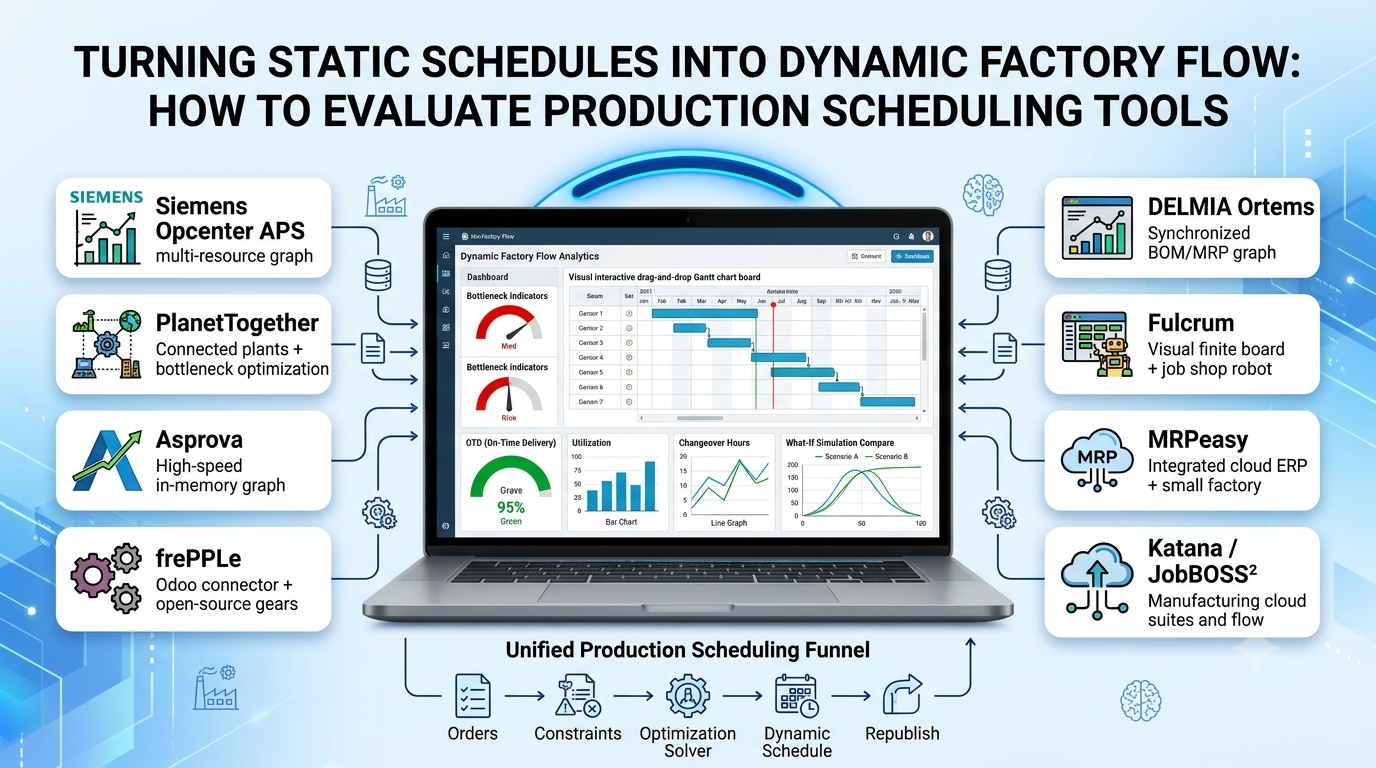
Standard ERP and MRP engines rely on infinite capacity scheduling—assuming that if you release fifty work orders due next Friday, every CNC machine, paint booth, and certified welder will somehow finish them simultaneously. On the real shop floor, that illusion collapses immediately: shared bottlenecks overload, changeover times explode, rush orders derail promised ship dates, and schedulers spend four hours every morning manually dragging boxes across massive Excel Gantt charts.
Advanced Planning and Scheduling (APS) and Production Scheduling tools replace static spreadsheets with constraint-aware mathematical optimization—sequencing operations across finite machine, tooling, labor, and material constraints while letting planners simulate “what-if” scenarios in seconds when a machine breaks down or a VIP order arrives.
Five Core Capabilities of Modern Production Scheduling Software
When evaluating an APS or production scheduling system, look beyond pretty Gantt visualizations to inspect five core scheduling mechanics:
- Finite Capacity Scheduling Across Multi-Resource Constraints: Scheduling operations simultaneously against machine availability, specialized tooling/dies, certified operator shifts, and real-time raw material arrival dates—never scheduling a job before its prerequisite sub-assembly or material lot is available.
- Sequence-Dependent Setup and Changeover Optimization: In food/beverage, plastics, chemicals, and metal coating, switching from dark paint to white paint—or allergen to allergen-free recipes—requires hours of washout, whereas sequencing light-to-dark takes minutes. Optimization solvers group compatible attributes automatically to reclaim hidden machine capacity.
- Interactive Drag-and-Drop Gantt With Instant Ripple Recalculation: Allowing schedulers to drag a single urgent order onto an earlier shift while the engine automatically shifts downstream dependent operations, highlights new late-order risks, and preserves locked (“frozen zone”) operations currently running on machines.
- “What-If” Scenario Sandboxing: Creating isolated simulation branches (“What happens if Press #4 goes down for 16 hours?” or “Should we authorize Saturday overtime vs. subcontracting?”) and comparing KPIs—on-time delivery (OTD), total changeover hours, WIP inventory, and machine utilization—side by side before publishing the winning schedule.
- Closed-Loop ERP and MES/Shop-Floor Synchronization: Pulling open orders, routings, and inventory from ERP, ingesting real-time job start/completion progress from MES or shop-floor terminals, and republishing updated schedules continuously.
Leading Production Scheduling Tools and APS Platforms
Siemens Opcenter APS (formerly Preactor)
Siemens Opcenter APS is one of the most widely deployed dedicated Advanced Planning and Scheduling engines globally across discrete and process manufacturing. Supporting customizable scheduling rules, sequence-dependent changeover matrices, multi-constraint resource modeling, and interactive Gantt sandboxes, Opcenter APS integrates smoothly not only with Siemens Opcenter MES and SAP, but also with dozens of third-party ERPs (NetSuite, Microsoft Dynamics, Epicor, Infor).
Mid-to-large manufacturers with complex multi-stage routings, changeover-sensitive lines, and established ERP systems rely heavily on Opcenter APS for proven optimization depth. Implementation typically involves specialized APS consulting to model custom constraint logic.
PlanetTogether
PlanetTogether is a dedicated multi-plant APS platform designed for mid-market discrete, batch, and process manufacturers (especially food and beverage, consumer goods, packaging, and industrial equipment). Offering visual drag-and-drop Gantt boards, attribute-based changeover optimization, multi-plant capacity balancing, and pre-built connectors for SAP, NetSuite, Dynamics 365, and Infor, PlanetTogether emphasizes clear executive KPI scorecards alongside planner usability.
Multi-facility manufacturers needing synchronized master scheduling across plants—and intuitive “what-if” impact comparison—gravitate toward PlanetTogether.
DELMIA Ortems (Dassault Systèmes)
DELMIA Ortems combines finite-capacity production scheduling with synchronized Manufacturing Resource Planning (MRP) and capacity optimization—excelling in regulated life sciences, aerospace, automotive, and complex assembly environments where multi-level BOM dependencies and strict shelf-life or sterilization constraints govern sequencing.
Asprova
Originating in Japan and widely deployed across automotive, electronics, and precision manufacturing worldwide, Asprova is renowned for high-speed memory-resident scheduling capable of sequencing hundreds of thousands of operations across complex multi-process networks in seconds—making it well suited for high-volume, intricate discrete supply chains.
FrePPLe (Open-Source APS) and Lean Cloud Schedulers (JobBOSS², Katana, Fulcrum)
- FrePPLe is the leading open-source (AGPL) Advanced Planning and Scheduling platform—offering finite-capacity scheduling, demand forecasting, inventory planning, and native Odoo integration for engineering-savvy manufacturers avoiding proprietary APS licensing.
- For smaller job shops and custom fabricators, lightweight visual schedulers embedded in modern cloud suites like Fulcrum, JobBOSS², or Katana provide real-time drag-and-drop scheduling boards without enterprise APS consulting overhead.
Production Scheduling Tools Comparison
| Platform | Optimization & Constraint Depth | Multi-Plant & ERP Integration | Changeover & Attribute Sequencing | Deployment & Licensing | Best Fit |
| Siemens Opcenter APS | Very High (custom rules, multi-constraint & solver plugins) | Broad ERP connectors (SAP, Dynamics, NetSuite, Infor) | Strong sequence-dependent setup matrices | On-premises & Cloud enterprise licensing | Mid-to-large discrete & process plants with complex constraints |
| PlanetTogether | High (finite capacity, bottleneck & multi-plant balancing) | Pre-built connectors for SAP, NetSuite, D365, Epicor | Strong attribute & family grouping optimization | Cloud SaaS & On-Premises | Multi-plant mid-market manufacturers (food, CPG, packaging) |
| DELMIA Ortems | Very High (synchronized BOM/MRP + finite scheduling) | Deep SAP, Dassault & enterprise ERP integration | Strong life-science, shelf-life & multi-level constraints | Enterprise On-Premises & Cloud | Aerospace, pharmaceutical & complex multi-level assembly |
| Asprova | Very High (ultra-fast in-memory large-scale scheduling) | Flexible CSV/API/ERP connectors | Granular high-volume operation & tooling rules | Windows / Server enterprise licensing | High-volume automotive, electronics & precision manufacturers |
| FrePPLe | Moderate–High (finite capacity, forecasting & inventory) | Native Odoo connector + open REST/CSV APIs | Configurable setup rules & calendar constraints | Open-source (AGPL) + Commercial Cloud | SMB/mid-market teams wanting open-source APS control |
| Fulcrum / JobBOSS² | Moderate (visual finite boards for job shops) | Native within their own cloud ERP/MRP suites | Basic priority & machine-group scheduling | Cloud SaaS | Small custom job shops & contract manufacturers |
Common Production Scheduling Pitfalls to Avoid
- Modeling Every Micro-Constraint on Day One: Attempting to model every hand tool, break-room rotation, and minor fixture in your initial APS rollout produces an unmaintainable rules engine that planners override manually. Focus finite constraints on your top 15–20% true bottleneck work centers and critical changeover dependencies first.
- Ignoring Routing Data Accuracy (Run Rates and Setup Times): If your ERP routing claims a CNC operation takes 12 minutes when actual floor cycle time is 19 minutes, any APS optimizer will generate an unachievable fantasy schedule. Validate standard run and setup times against actual machine telemetry before go-live.
- Eliminating the Frozen Scheduling Window: Republishing a completely reshuffled schedule every two hours drives material handlers and setup crews crazy. Establish a 24- to 48-hour frozen zone where active jobs stay locked unless an emergency breakdown occurs.
Selecting the Right Production Scheduling Tool
Match your scheduling investment to your bottleneck complexity and ERP environment:
- For Small Custom Job Shops: Start with the visual scheduling board inside a modern cloud suite like Fulcrum or MRPeasy before buying standalone APS software.
- For Mid-Market Plants Outgrowing Excel Gantt Charts: Evaluate PlanetTogether or Siemens Opcenter APS—or FrePPLe if you run Odoo or prefer an open-source foundation.
- For High-Volume, Multi-Level Complex Discrete or Regulated Plants: Standardize on Siemens Opcenter APS, DELMIA Ortems, or Asprova to handle deep BOM-synchronized constraints at scale.
